
Your iPhone battery dies faster each year. You are not imagining it. Most users watch their battery health plummet to 85% within two years, leading to mid-day charging panic or a costly $99+ repair bill. The hidden cause is often your daily iPhone battery charging habits.
We will reveal why keeping a lithium ion battery at 100% causes damage and how the 80-20 rule prevents it. You will also learn to master Apple’s optimized battery charging settings to protect your investment. These simple steps can add years to your phone’s life.
1. Why Charging to 100% Damages Your iPhone Battery?
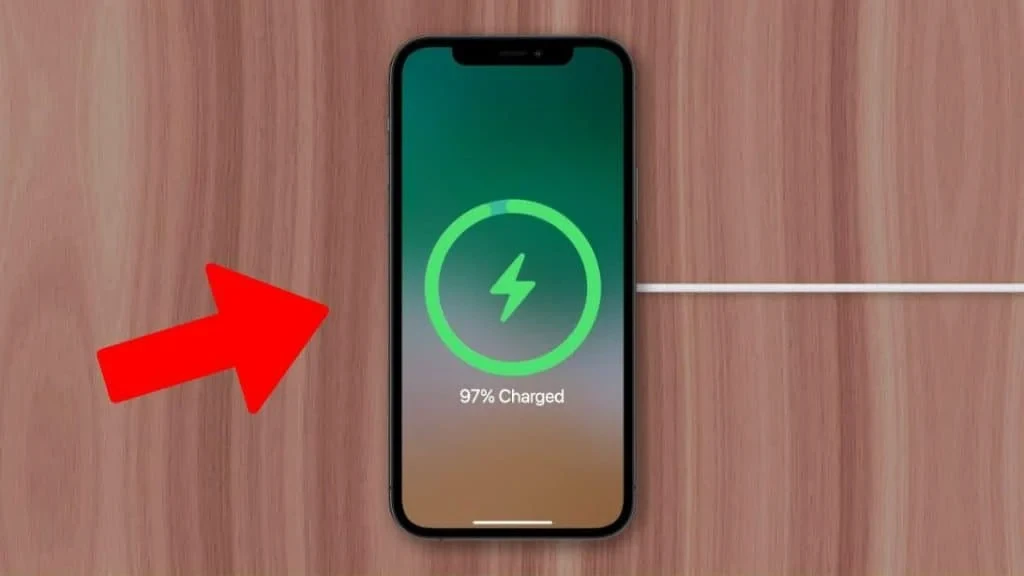
Charging your device to 100% forces the lithium-ion cell into a high-voltage state, creating significant chemical stress. Research indicates that maintaining a charge level above 80% accelerates electrolyte oxidation, which permanently shortens lithium ion battery lifespan. This high-pressure state also generates excess heat, the primary enemy of long-term battery health.
Apple explicitly validates this chemistry through its “Optimized Battery Charging” feature, which is designed to pause intake at 80% specifically to reduce aging. Real-world observations suggest that users who constantly maintain a full charge often experience accelerated iPhone battery degradation, sometimes losing roughly 1% of capacity per month compared to those who limit maximum voltage.
2. What Apple Won’t Tell You About Battery Cycles?
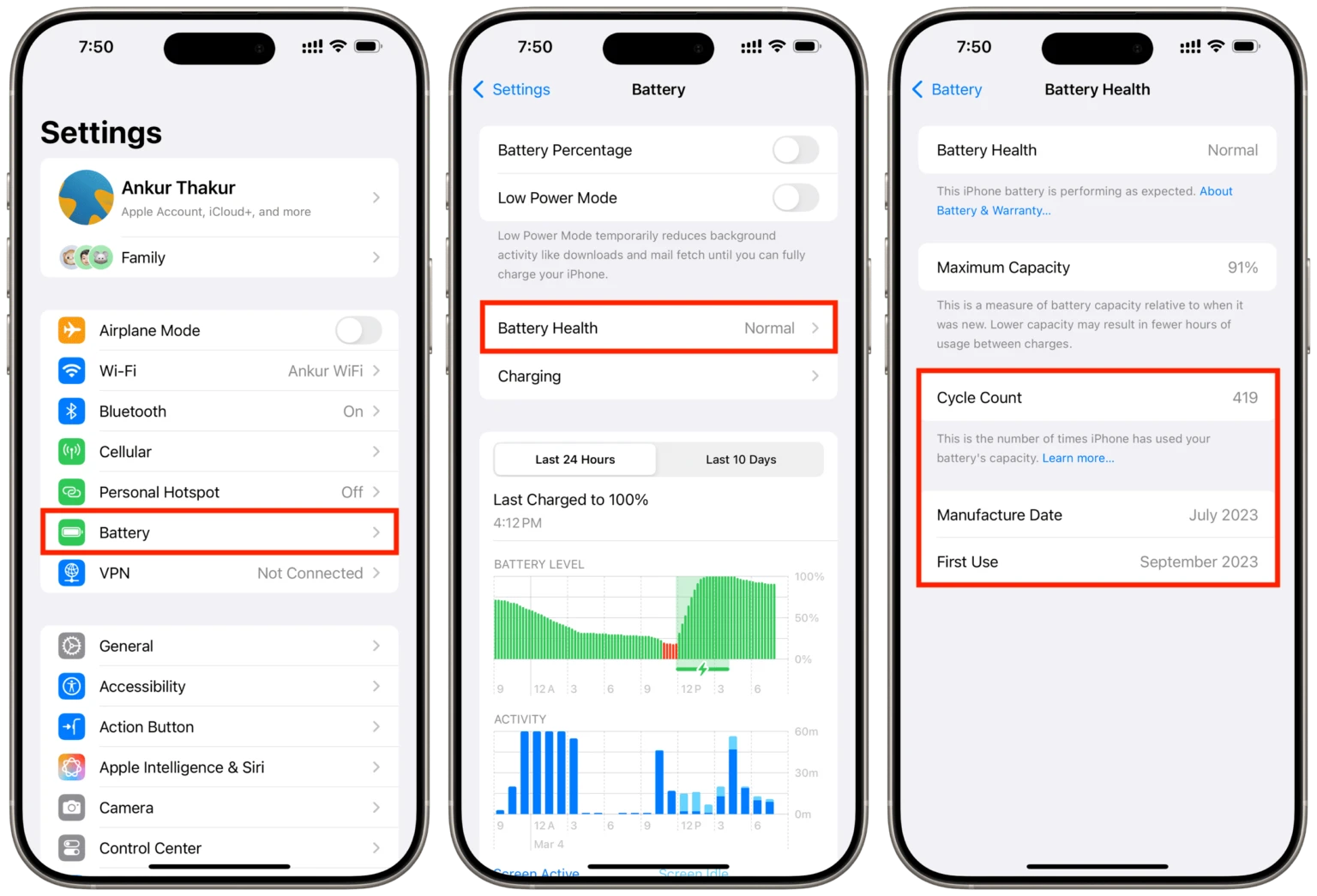
Many users misunderstand battery cycles. Apple officially defines one cycle as discharging 100% of capacity, which often accumulates over multiple days rather than a single charge. Forget the outdated myth of “training” your battery by draining it to zero; this actually stresses the chemical structure. Instead, partial charging habits are perfectly safe.
On iPhone 15 and newer, you can view this exact number in Settings. Typically, reaching 500 to 1,000 battery cycles means your iPhone battery health has degraded to around 80%, indicating it is approaching the end of its optimal lifespan.
3. The Science Behind the 80-20 Rule
University research and Battery University data reveal that charging past 80% pushes lithium ion battery voltage into a high-stress zone, accelerating electrolyte oxidation. Conversely, draining below 20% triggers chemical decomposition and spikes internal resistance.
Keeping your device in this safe zone can triple its lifespan. This science drives Tesla’s charging optimization advice to limit daily charges to 80%. Furthermore, high heat at 100% charge is the fastest way to degrade battery chemistry, while cold charging causes permanent metallic plating.
4. How to Use Apple’s Optimized Battery Charging Feature?
“Optimized Battery Charging” preserves battery health by reducing the time your iPhone spends fully charged. It pauses charging at 80% and waits to deliver the final 20% until just before you wake up, minimizing chemical stress.
How to Turn It On?
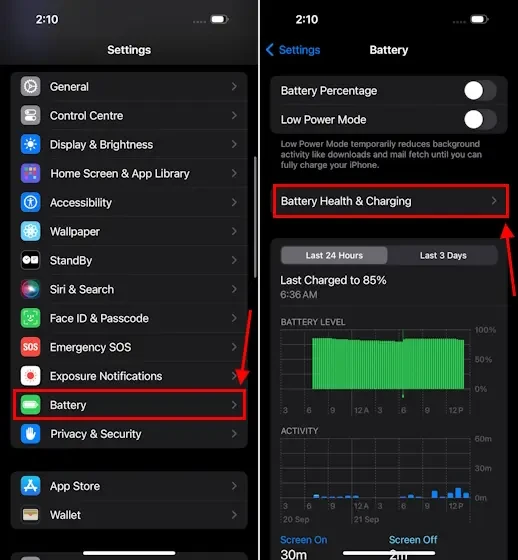
- Open Settings.
- Tap Battery.
- Select Battery Health & Charging.
- Toggle Optimized Battery Charging to ON.
The feature uses on-device machine learning to identify your daily charging routine. It activates only in locations you spend the most time, like your home or office. If your schedule is irregular or you are traveling, the feature automatically disables itself to ensure you have a full charge when you need it.
5. iPhone 15’s 80% Charging Limit: Should You Use It?
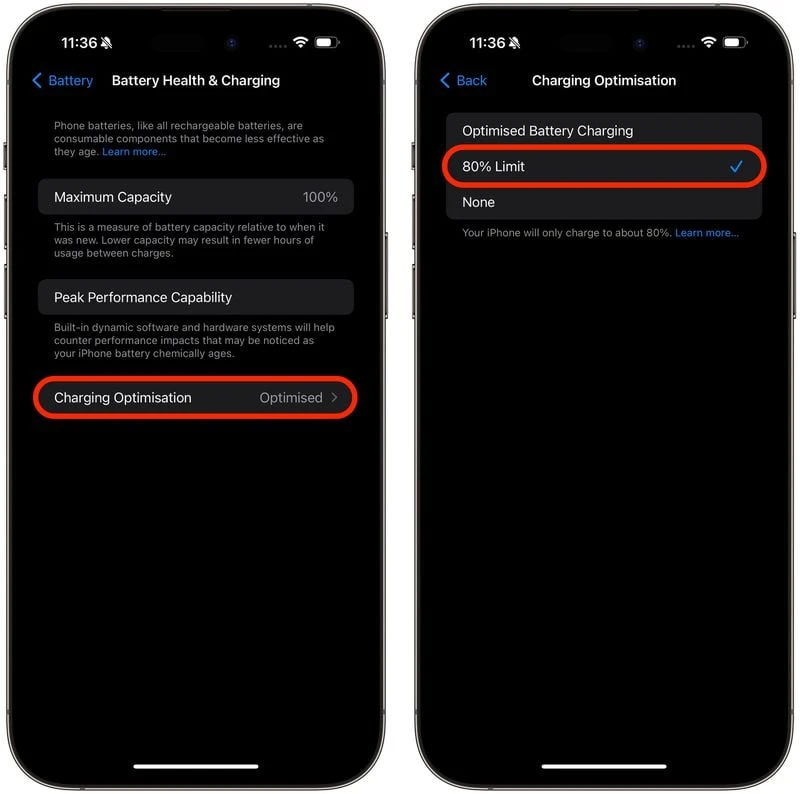
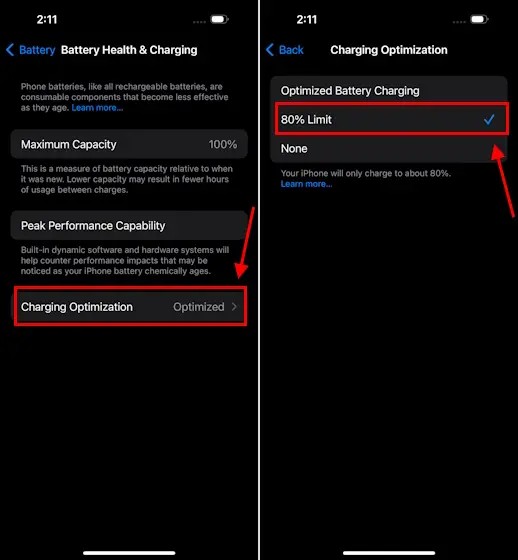
Exclusive to the iPhone 15 and later models, iOS 17 introduced a hard “80% Limit” that strictly prevents the device from charging past 80%, distinct from the standard “Optimized Battery Charging” which eventually fills to 100%.How to Set It: Navigate to Settings > Battery > Battery Health & Charging > Charging Optimization and select 80% Limit.
The Trade-off: Enabling this iPhone 15 battery limit effectively sacrifices 20% of your daily capacity immediately to potentially slow chemical aging. Real-world user reports are mixed; some users who stuck to the 80 percent limit for a year maintained 99% health, while others charging to 100% dropped to only 97%—a negligible difference for many.
Verdict:
- Use 80% Limit: If you sit at a desk with a charger all day or rarely drain your battery below 40%.
- Use Optimized Charging: If you have long days away from power and need every percent of capacity.
6. Does This Actually Extend Battery Life?
Real-world data from iPhone users reveals a mixed picture. While theory suggests the 80-20 rule triples battery cycle life, actual reports after one year show a smaller gap—often just a 2-4% difference in health between careful users and those who charge fully.
- Realistic Expectations: Limiting your charge prevents deep chemical aging, but heat and natural time degradation still occur. You might sit at 99% health after a year instead of 95%.
- The Cost Analysis: An official battery replacement costs roughly $99. Ask yourself if saving that amount over three years is worth sacrificing 20% of your daily capacity every single morning.
- When It Matters: The benefits become most visible after year two. If you upgrade annually, you are saving the battery for the next owner, not yourself.
7. When You Should Charge to 100% (Yes, Really)?
While limiting charge protects battery health, real life often requires maximum power. If you are traveling, heading into a long day of navigation and photos, or entering an emergency situation where power sources are uncertain, always charge to 100%. The immediate utility of a working phone outweighs the negligible wear of a single full cycle.
Regarding “calibration,” modern iPhones do not need to be drained and filled to “teach” the battery capacity. However, if your percentage indicator becomes erratic (e.g., jumping from 20% to 10% instantly), a single 0-to-100% cycle can help the software recalibrate its estimate of the battery’s upper limit.
- Travel Tip: Turn off “80% Limit” temporarily for flights or road trips.
- Flexibility: Apple designed “Optimized Battery Charging” to be flexible; it aims to give you 100% exactly when you need it, proving that full capacity is sometimes the right choice.
